![MCHH00954_0000[1]](tc_081908_files/image002.gif) The
Traffic Cone
The
Traffic Cone
“Guiding you over and around
the bumps of your payroll journey”
Provided by Syl Luhring – Payroll Supervisor, State Accounting
(471-1460)
August 25, 2009
This note is intended for all of the agencies who received my
letter, dated August 14th, and the list of names and accounts for
verification. If you were fortunate
enough not to have received the letter, your account information for deposit of
the expense reimbursement payments was consistent with the information provided
on the payroll side and required no further action at that point.
When we began using NIS in 2003, all banking information from
the old program was “rolled forward” into NIS.
This included information on the Accounts Payable side as well as
Payroll. Now, as we are trying to
solidify the deposit information on both sides (Payroll and AP), we had
concerns about the integrity of the accounts listed in Accounts Payable for
direct deposit of the expense reimbursement (ER). Our intentions are to display every employee’s
deposit information (including that for the ER) on the payroll side in the Auto
Deposit screen. Creating the list was
the first of several steps to assure accuracy of the information listed for
both Payroll and ER as listed on the Auto Deposit Screen.
The list you received was created by comparing the list of employee’s
direct deposit accounts on the Accounts Payable side with those on the Payroll
side. If the AP number matched any of
the ones on the Payroll side, the name was not included on the list. Those AP account numbers that did not match
any account information in the Payroll list were printed out on the list with
AB#, Name, Account #, and the Security Business Unit the employee was
affiliated with. These accounts would
not appear on the employee’s Auto Deposit screen since the number did not match
any of those on the Payroll list.
The intent of the August 14th letter was for you
to contact each employee on the list to confirm that the account number listed
is an active account and the one to which they want the expense reimbursement
to go. If it is the correct number,
please enter that information onto the auto deposit screen under employee
information as an “Expense Reimbursement account”. (See screen shot below). If the account is not correct, send the
employee a copy of the Direct Deposit Information form asking them to complete
the form with the new number.
Some agencies are sending the Information form to all
employees regardless, asking them to update the information in the system and
to list the account to be set for deposit of the expense reimbursement. This process creates more work on your part
but will ultimately result in cleaner deposit information and less errors when
making an ER deposit.
The last step of the conversion process will occur on
September 14th. A query will
be run to identify any employee who does not have an expense reimbursement
account set up in NIS. Those accounts
will be automatically set up with the expense deposit being scheduled to go
into the same account as that designated for the remainder “R” of the payroll
deposit.
I hope this sheds a little more light on the August 14th
letter. If you have problems or
questions about the process, please call or email me. 471-1460 or syl.luhring@nebraska.gov
Thanks again for your cooperation in this effort.
Auto
Deposit Setup
For Payroll – Enter the start date,
bank account number, bank transit number, method code, and a 22 (checking) or a
32 (savings). The pre-note flag should
always be set to N.
For Expense Reimbursement – follow the same
process as above but adding the same date as the start date into the stop date
(this is mandatory). In the MC column,
enter an “E” instead of the other options offered above. This flags the account as the expense
reimbursement deposit account.
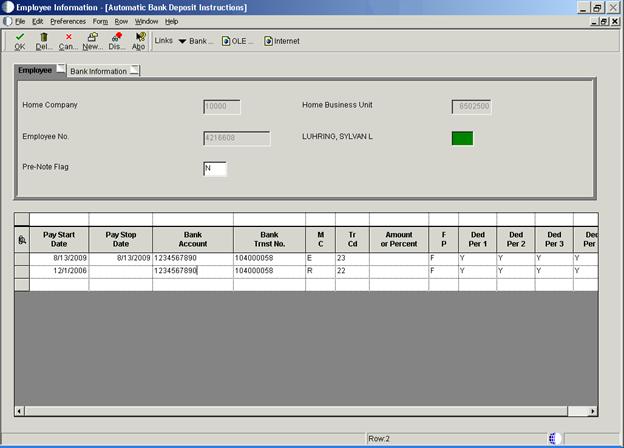
State Accounting uses the entries on this line to identify
the ER accounts to be set up and runs a daily process by which this ER auto
deposit information is transferred into the employee’s file on the AP side
for the expense reimbursement payment.